Query fan-out: what it is and how to track it
AI engines expand one question into many hidden sub-queries. Query fan-out shows you those sub-queries so you can cover them in your content.
Query fan-out is what happens when an AI engine turns one question into several web searches before it answers. Ask ChatGPT for “the best CRM for a small business” and it may search “best CRM for small business 2026”, “CRM pricing comparison” and “HubSpot vs Pipedrive for small teams”, then build one answer from what it reads.
To track query fan-out in Orchly, open AI Visibility and click the Query Fanouts tab. It shows the hidden searches behind your tracked prompts, how often each one runs, and how visible you are in the answers that used it.
Why query fan-out matters for AI search
You can rank well for your main keyword and still be left out of the AI answer. The engine also searched three or four narrower questions, and if your content doesn’t cover them, a competitor’s page fills the gap.
Fan-out gives you the engine’s own research plan. It’s the closest thing GEO has to keyword research: real searches, from the model itself, tied to the prompts you care about.
The fan-out summary
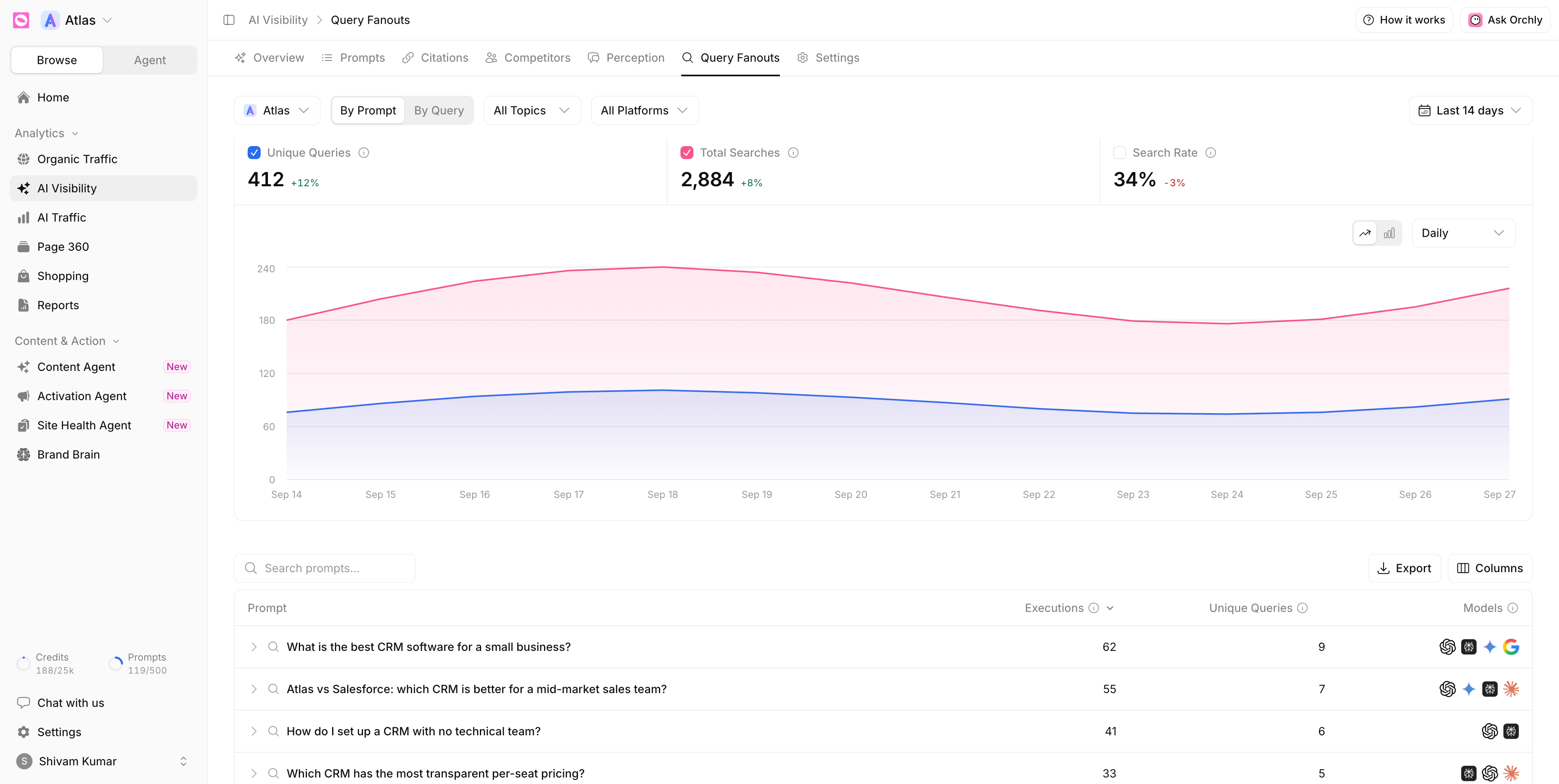
Three numbers sit at the top, and you can plot any of them on the chart:
- Unique Queries. How many different web searches the models ran while answering your prompts. The same phrase searched fifty times counts once.
- Total Searches. Every search across every answer, repeats included. Rising searches with flat unique queries means the models keep asking the same things.
- Search Rate. How often a model looked something up instead of answering from memory.
A model can only cite a page it actually reads. When Search Rate is high for a topic, new and better content can change the answer. When it’s low, the model is leaning on what it already knows, and change is slower.
By Prompt and By Query
Switch views with By Prompt (the default) and By Query. Filter with the brand picker, topics, tags, branding, intent, platforms and the date range.
By Prompt lists your tracked prompts:
| Column | What it tells you |
|---|---|
| Prompt | The tracked question |
| Executions | How many times it was answered in the period, counting each platform separately |
| Unique Queries | How many different searches the models ran to answer it |
| Models | The AI platforms that ran searches for it |
Expand a prompt to see the searches it triggered. A high Unique Queries count means the question takes research, which is where being the cited source pays off.
By Query flips it around and lists the searches themselves:
| Column | What it tells you |
|---|---|
| Query | The search the model ran |
| Times Used | How many answers ran this exact search |
| Prompts | How many of your tracked prompts led to it |
| Visibility | How often you were mentioned in the answers that ran this search |
| Models | The AI platforms that ran it |
Fan-out data only comes from platforms that publish the searches behind their answers. A model missing from the Models column may still have answered the prompt, it just didn’t reveal what it searched.
How to use query fan-out in your content
- Open By Query and sort by Times Used.
- Look for searches used often where your Visibility is low. Those are real, frequent questions the engines ask on your buyers’ behalf, and you’re not in the answer.
- Check Prompts. A search shared by several prompts sits at the center of your topic and is worth a dedicated page or section.
- Write content that answers the whole cluster. One heading per sub-question works well, because the engine is already asking them.
Take the searches behind one prompt and turn them into the H2s of a single page. You’ll cover what the engine actually wants to know, not just the headline keyword.
Where fan-out fits with the rest of Orchly
- Find a prompt you’re losing on the Prompts tab.
- Read its fan-out here to see the searches behind it.
- Check Citations to see which pages win those searches today.
- Hand the outline to the Content Agent to draft, or generate content ideas from your data.
Orchly AI also reads your fan-out searches when you research new prompts, so what the engines search for shapes what you track next.