How to create keyword clusters for SEO
Topic clusters group related keywords so you can track organic performance by theme instead of one keyword at a time. How to build them in Orchly.
A keyword cluster for SEO (Orchly calls it a topic cluster) is a group of related keywords you track as one theme, like “sugar-free” or “wholesale”, instead of watching hundreds of queries one at a time. In Orchly, you build topic clusters from your Search Console keywords and see their clicks, impressions, CTR and position rolled up on the organic dashboard.
Open Analytics → Organic Traffic, go to the Settings tab and find Topic Clusters.
How does a topic cluster work in Orchly?
The rule is simple: a search query joins a cluster if it contains any of the cluster’s keywords. A “Sugar-free” cluster with the keywords sugar-free, sweets pulls in every query that mentions either word.
One query can sit in more than one cluster. That’s fine and often useful, for example when “sugar-free chocolate” belongs to both your Sugar-free and Chocolate themes.
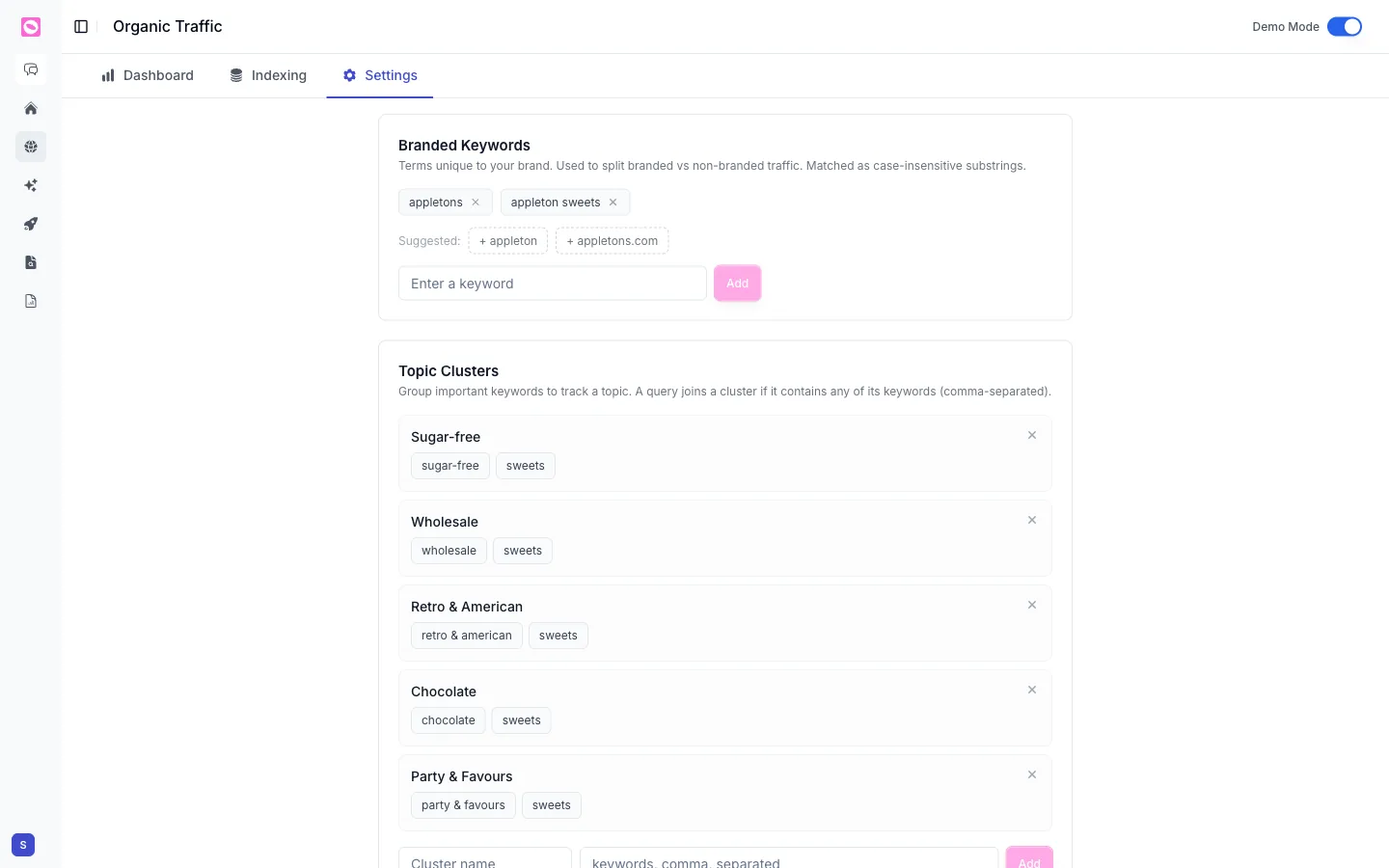
How to create a keyword cluster
- In Topic Clusters, type a name in Cluster name (for example, “Chocolate”).
- In the keywords, comma, separated field, add the words that define it:
chocolate, cocoa, truffle. - Click Add.
The new cluster appears in the list with its keywords as chips. To remove a cluster, click the x on its row. To change a cluster’s keywords, remove it and add it again with the new list.
Build clusters around the buckets your team already talks about: product lines, use cases, funnel stages. Then the dashboard mirrors how the business thinks, and the numbers are easy to explain to anyone.
See your clusters on the dashboard
Go back to the Dashboard tab and make sure the source is Search Console. On the Keywords tab, switch View by to Topic Clusters.
Now clicks, impressions, CTR and position are summed per cluster. You can tell at a glance whether “sugar-free” is growing while “wholesale” stalls, which a list of single keywords rarely shows.
Topic clusters are keyword based, so they only apply to Search Console keyword data. To group pages instead, use content groups.
Tips for better keyword clusters
- Use word stems.
insurcatches insurance, insurer and insured, because a keyword matches anywhere inside a query, and case doesn’t matter. - Keep keywords specific. A very common word like
bestwould pull half your queries into one cluster. - Pair with the branded filter. Set the dashboard to Non-branded to see how a topic performs with people who don’t know you yet. See branded vs non-branded keywords.
- Feed clusters back into content. A cluster losing position is a good brief for the Content Agent.
For the rest of the dashboard, see how to track organic search traffic in Orchly.