How to track AI search visibility for your brand
Track how often ChatGPT, Perplexity, Google AI Overviews and other AI engines mention your brand, and how you rank against competitors.
To track AI search visibility for your brand, open AI Visibility from the sidebar. Orchly asks ChatGPT, Google AI Overviews, Perplexity and any add-on engines the prompts your buyers ask, reads every answer, and records whether your brand was named, where, how favorably, and which pages were cited.
This page is the map. It covers what gets measured, how to set it up, and what each tab is for, with links to the detailed guides.
Which AI platforms does Orchly track?
Every plan includes three answer engines. Three more are paid add-ons you switch on from Plan & usage in Settings.
| Platform | Included |
|---|---|
| ChatGPT | Yes |
| Google AI Overview | Yes |
| Perplexity | Yes |
| Gemini | Add-on |
| Google AI Mode | Add-on |
| Claude | Add-on |
Add-ons you don’t have still show in the All Platforms filter, with a lock. Hover one and you’ll see “Claude is an add-on. Add it from Billing to start tracking it.” Plans and add-ons are covered in billing and plans.
Orchly reads answers from the AI platforms the way a real person sees them, and runs each prompt for the market you set on it. Answers differ by country, so the same question can score differently in the US and the UK.
Set up AI search visibility tracking
Setup lives in the Settings tab, which has four sections: Your Brand, Topics & Prompts, Competitors and Tags. Onboarding fills most of it in, so treat this as a check rather than a chore.
- Your Brand. Click Edit Brand Details and check Brand Name, Website URL, Also Known As and Other Domains. Aliases catch mentions under old names or product names. Other domains make sure a citation of your docs or blog subdomain counts as yours.
- Topics & Prompts. Prompts are the questions Orchly asks, grouped under topics. Use Add prompts to research prompts with Orchly AI, write your own, or import a CSV.
- Competitors. Click Add Competitor, or open Suggestions to track brands that already show up next to you in AI answers. See Brand Brain competitors.
- Tags. Optional labels for slicing reports. See tag and label prompts.
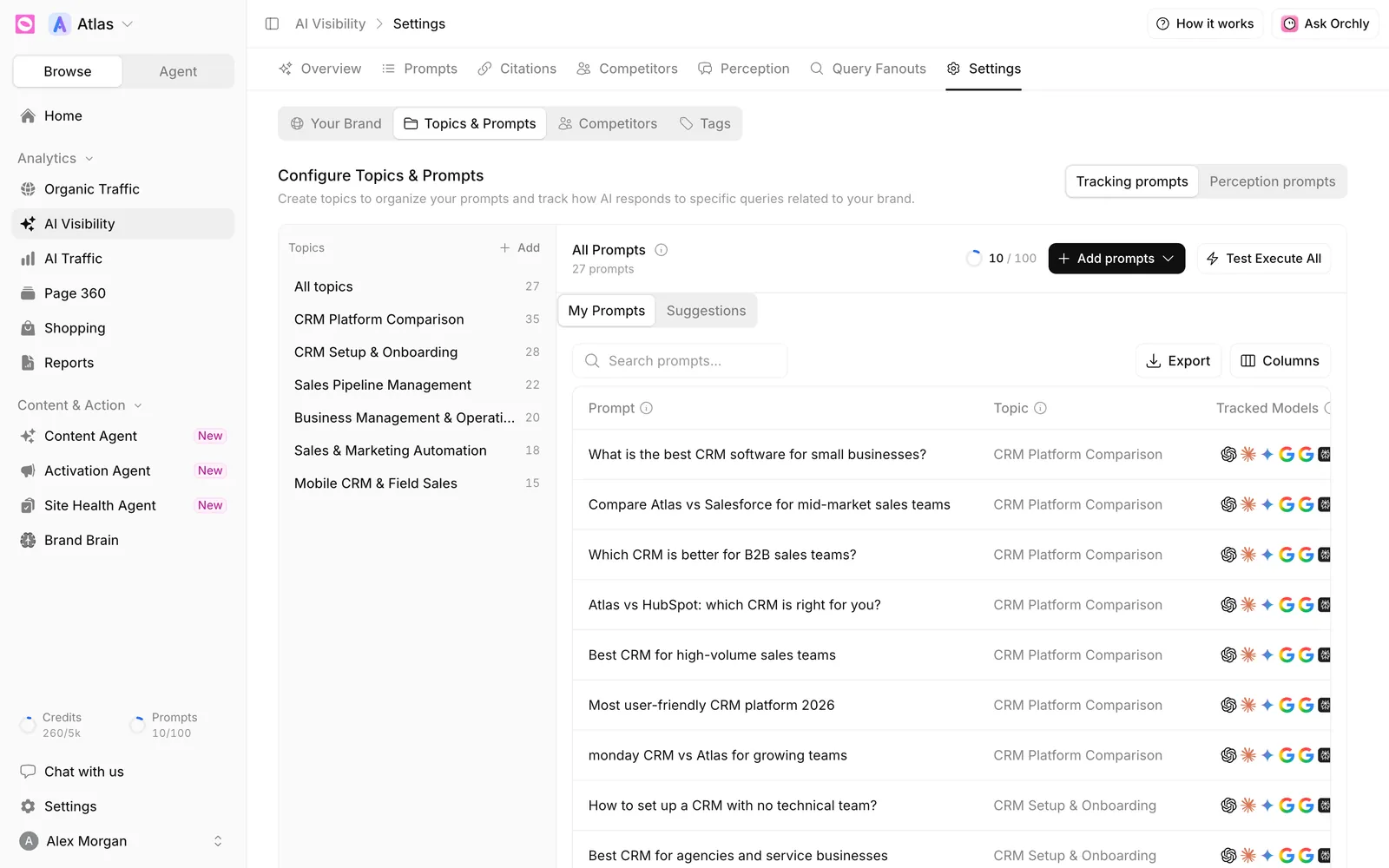
Your first results take 20 to 30 minutes. Until then the tabs show “Collecting your first results”.
Twenty to fifty prompts spread over a handful of topics is plenty to start. Your prompt limit is shared by every workspace in your organization, and paused prompts don’t count toward it.
What AI visibility measures
The four headline numbers on Overview are:
- Visibility Score. The share of answers that mention your brand.
- Share of Voice. Your mentions as a share of every brand mention in those answers.
- Avg Sentiment. How favorably answers describe you, from 0 to 100.
- Avg Position. Where you’re named on average. 1 means first.
A quick example. You track 10 prompts on 3 engines, so one run gives 30 answers. You appear in 12 of them, which is a 40% Visibility Score. Those answers name 50 brands in total and 12 of the mentions are yours, so Share of Voice is 24%. You’re visible, but competitors take most of the conversation. That gap is where to work next.
The AI Visibility tabs
The page has seven tabs: Overview, Prompts, Citations, Competitors, Perception, Query Fanouts and Settings. Most share one filter bar with a brand picker, topics, tags, branding, intent, platforms and a date range.
Overview
Your headline scores over time, a Leaderboard that ranks you against competitors, platform-by-platform metrics, your citation rate, share of voice, sentiment, top cited domains and recent mentions. Further down are Top Visible Brands and the Performance Matrix.
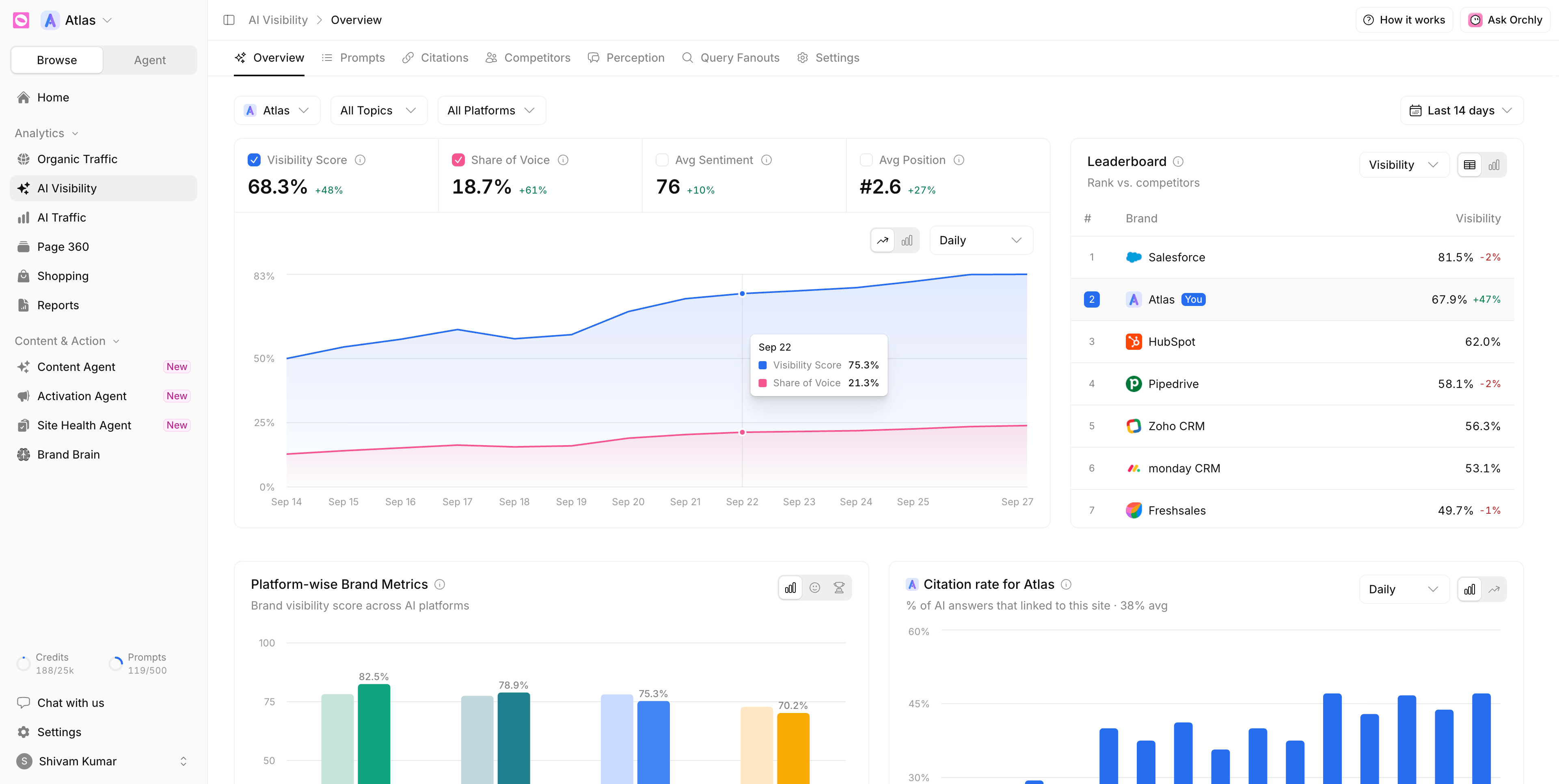
The Leaderboard can rank by Visibility, Position or SOV, as a table or a bar chart. Your brand carries a You badge.
Prompts
Every tracked prompt with its visibility, sentiment, position, share of voice and more. Click a prompt to read the actual answers. See track AI prompts.
Citations
The pages and domains AI engines cite for your prompts, and the Mention Gap grid of pages that name competitors but not you. See track AI citations.
Competitors
The Performance Matrix and Top Visible Brands on one screen, for comparing every brand by platform, topic or prompt. See compare competitor AI visibility.
Perception
How AI describes your brand, the objections it raises, and a fact check against what you’ve told Orchly. It runs its own weekly perception prompts, which don’t count toward your prompt limit.
- See how AI describes your brand
- Find why AI tells buyers no
- Fact-check what AI says about you
- Set up perception prompts
Query Fanouts
The web searches AI models run behind the scenes to answer your prompts. See understand query fan-out.
See the data as a competitor
The brand picker, the first filter on most tabs, does two jobs. Tick competitors to add them to comparisons. Hover a competitor and click Simulate to see every tab from that brand’s side. A banner reads “Simulating the view for Salesforce” until you click Exit simulation.
Simulating is the fastest way to answer “what is Salesforce’s best prompt?” or “which pages cite HubSpot?” without building a separate workspace.
A weekly AI visibility routine
- On Prompts, sort by Visibility and find low scores on prompts that matter to revenue.
- Open one and read the answers that left you out.
- Check Citations for the pages those answers lean on, and whether you’re mentioned there.
- Write or refresh a page, or pitch the sites in your Mention Gap.
- Watch the trend over the next few weeks, not the next few hours.
You don’t have to do it all by hand. The Content Agent turns gaps into article briefs, and Ask Orchly can answer questions about this data in plain English.
AI answers change from run to run. A single drop is often noise. A slide across a week or two on the same topic is a signal worth chasing.