How to track AI referral traffic from ChatGPT
See which AI crawlers read your site and how many people click through from ChatGPT, Perplexity, Claude and Gemini.
To track AI referral traffic from ChatGPT and other assistants, open AI Traffic in Orchly. It shows two things your normal analytics misses: the AI crawlers reading your pages (GPTBot, ClaudeBot, PerplexityBot, OAI-SearchBot and dozens more) and the real people who click through to your site from ChatGPT, Perplexity, Claude, Gemini or Copilot.
In Orchly it lives under Analytics → AI Traffic in the sidebar. The page has four tabs: Analytics, Pages, Traffic log and Settings.
AI Traffic is part of the Pro and Business plans. Before any numbers appear, you connect the place your site is hosted. See how to connect a CMS to track AI traffic.
Why track AI referral traffic and crawlers?
Google Analytics can’t see most of this. AI crawlers don’t run JavaScript, so the GA tag never fires for them. And ChatGPT’s in-app browser often sends no referrer, so those clicks land in “direct”.
That hides two useful signals:
- Crawls come before citations. ChatGPT or Perplexity has to fetch a page before it can quote it. More AI bot visits to a page is an early sign it’s on its way into AI answers.
- AI referrals are warm visitors. Someone who clicks a link inside an AI answer has already read a recommendation. You want to know which pages they land on and whether that number grows.
Orchly catches referrals by the referring site and by the utm_source tags AI assistants add to links (ChatGPT adds utm_source=chatgpt.com, for example), so fewer of those clicks go missing.
The Analytics tab: bots vs humans per platform
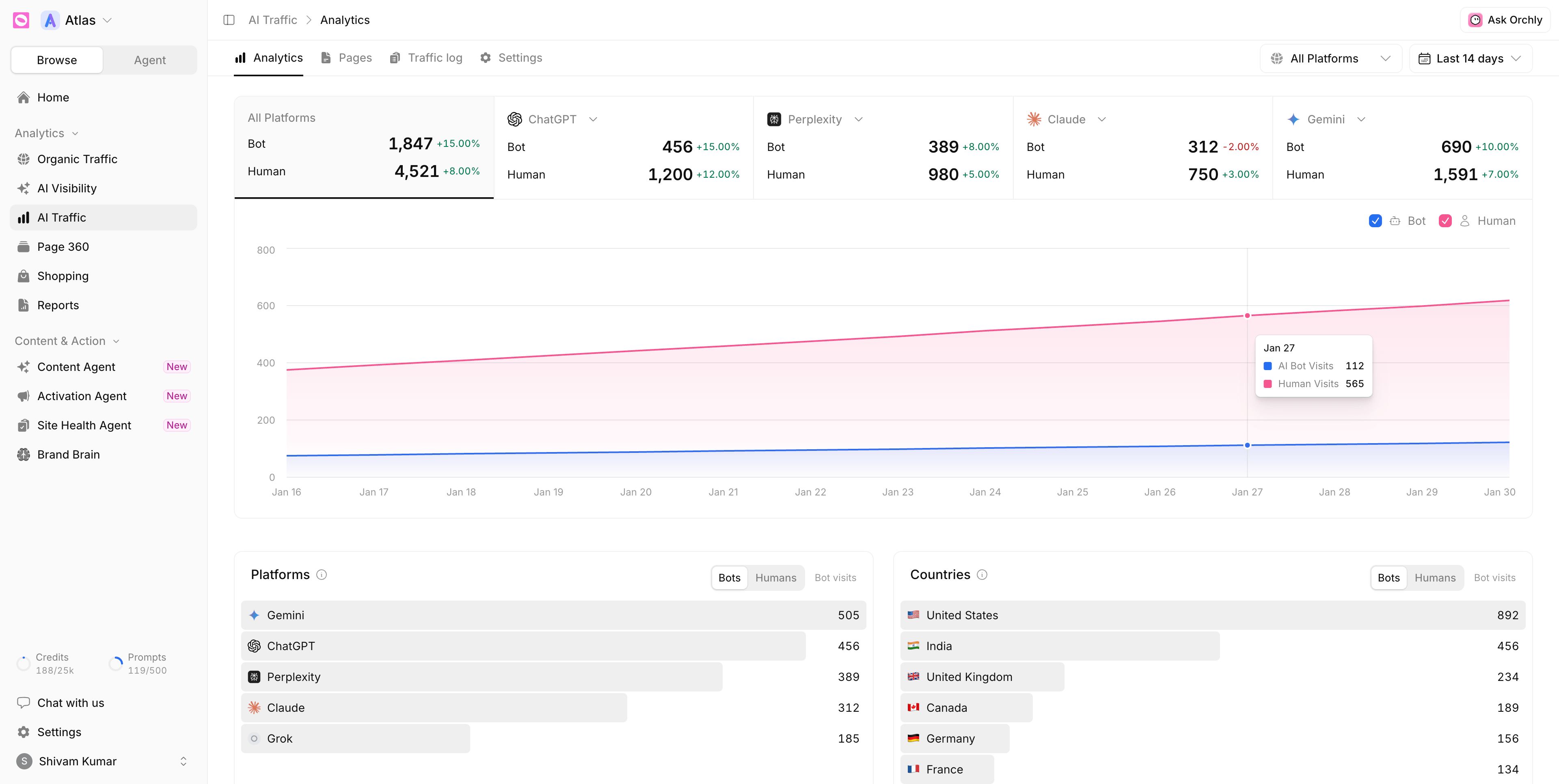
The row of cards at the top starts with All Platforms, then four AI platforms. Each card shows Bot and Human visits with the change against the previous period. Don’t care about one of the four? Use the arrow next to its name (Swap platform) to put a different platform in that slot.
- Bot counts AI crawlers and fetchers reading your pages.
- Human counts people who arrived by clicking a link in an AI answer.
Click a card to chart just that platform. Tick or untick Bot and Human above the chart to focus on one line.
Two filters sit at the top right of every tab except Settings: the platform picker (All Platforms by default) and the date range. Change them once and the Pages tab and Traffic log follow.
Platforms and Countries
Under the chart, Platforms ranks the AI products sending you traffic and Countries ranks where it comes from. Each list has a Bots / Humans switch, so you can see that Gemini crawls you most while ChatGPT sends the most people, for instance.
Bot Types, Human vs AI Visits and Crawl responses
Scroll further and you get three more cards.
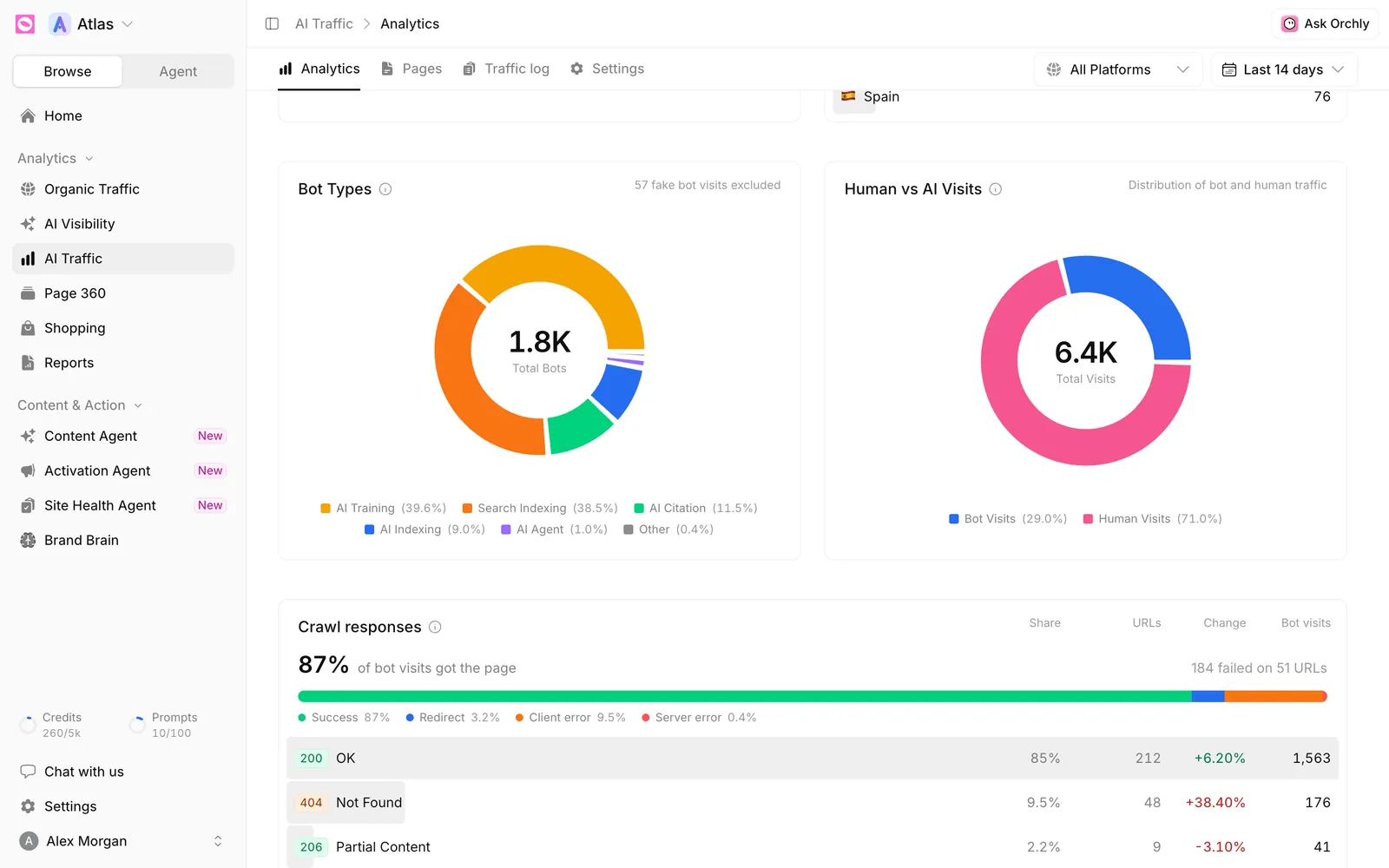
- Bot Types splits bot visits by why the bot came: AI Citation, AI Agent, AI Indexing, AI Training, Search Indexing and Other. The note in the corner tells you how many fake bot visits were excluded. The full list of bots in each group is in AI bot types and verified bots explained.
- Human vs AI Visits shows the share of bot visits against human visits.
- Crawl responses shows what your server sent back when AI bots asked for a page. The headline is the share of bot visits that got the page. Below it, every status code seen (200, 301, 404, 500 and so on) with its share, the number of URLs, the change and the bot visits.
A bot that gets a 404 or a server error can’t read the page, so it can’t cite it either. A rising error count in Crawl responses is worth fixing before anything else. Open the Traffic log, filter to the platform and look for the failing paths.
Pages, Traffic log and Settings
- Pages lists every page that got AI or search traffic, with a column per bot type plus Human Referrals.
- Traffic log is the raw feed: one row per request, including whether the bot was verified.
- Settings shows the tracking method in use and its health.
Both tables are covered in how to read AI traffic analytics and logs.
What to do with AI traffic data
- Feed your best pages. If AI engines fetch a few pages far more than the rest, keep them current and link from them to pages you want found.
- Find pages AI ignores. An important page with almost no AI Citation or AI Indexing visits may have a crawl problem. Run it through Site Health or open it in Page 360.
- Line crawls up with citations. Compare your most-fetched pages with the pages AI actually cites in AI citations.
- Watch the referral trend. Rising Human visits means your AI visibility work is turning into clicks.
You can also ask Ask Orchly questions like “which pages got the most ChatGPT visitors this month?” and it reads the same data.
Frequently asked questions
Why doesn’t Google Analytics show AI bot traffic?
GA4 only records visits that run its JavaScript tag. Most AI crawlers fetch the HTML and never run scripts. Orchly’s Cloudflare, Vercel and WordPress methods log requests at the server or edge, so they see the bots GA4 can’t.
Should I block AI bots?
Usually not, if you want to show up in AI answers. Blocking a crawler in robots.txt can take you out of that engine’s results. If you only object to training, block the training crawlers (like GPTBot) and leave the search and citation bots (like OAI-SearchBot and ChatGPT-User) alone.
What’s the difference between AI crawler traffic and AI referral traffic?
Crawler traffic is bots fetching your pages to train, index or answer a question. Referral traffic is people clicking a link in an AI answer and landing on your site. Orchly shows them as Bot and Human so you never mix them up.
Why is the dashboard empty right after I connected?
Nothing is backfilled. Tracking logs visits as they happen, so the page says Waiting for your first visits until the first AI bot or AI referral arrives, usually within a day.