Branded vs non-branded keywords explained
What branded and non-branded keywords are, why the split matters, and how to separate them in Orchly to see your true organic growth.
Branded keywords are searches that include your brand name, like “Orchly pricing” or “Orchly vs Semrush.” Non-branded keywords don’t mention you at all, like “ai visibility tracker” or “how to track chatgpt rankings.” The two behave so differently that lumping them together hides what’s really happening with your SEO.
This guide explains the difference, why the split matters, and how to separate the two in Orchly so your reports show real growth.
Why the branded vs non-branded split matters
People who search your name already know you. That traffic converts well, but it mostly reflects demand you’ve already earned through word of mouth, ads, or past content. It goes up when your brand gets more popular, not necessarily when your SEO improves.
Non-branded traffic is the opposite. Nobody searching “sugar free sweets wholesale” knows you yet. Ranking for those terms is how you reach new people, so non-branded clicks are the truest measure of SEO progress.
If a big campaign sends branded searches soaring, your total organic clicks look great even if non-branded traffic is flat. Splitting the two stops you from celebrating growth your SEO didn’t actually drive.
How to separate branded and non-branded keywords in Orchly
Orchly does the split for you once you tell it which terms are yours. Go to Analytics → Organic Traffic, open the Settings tab and find Branded Keywords.
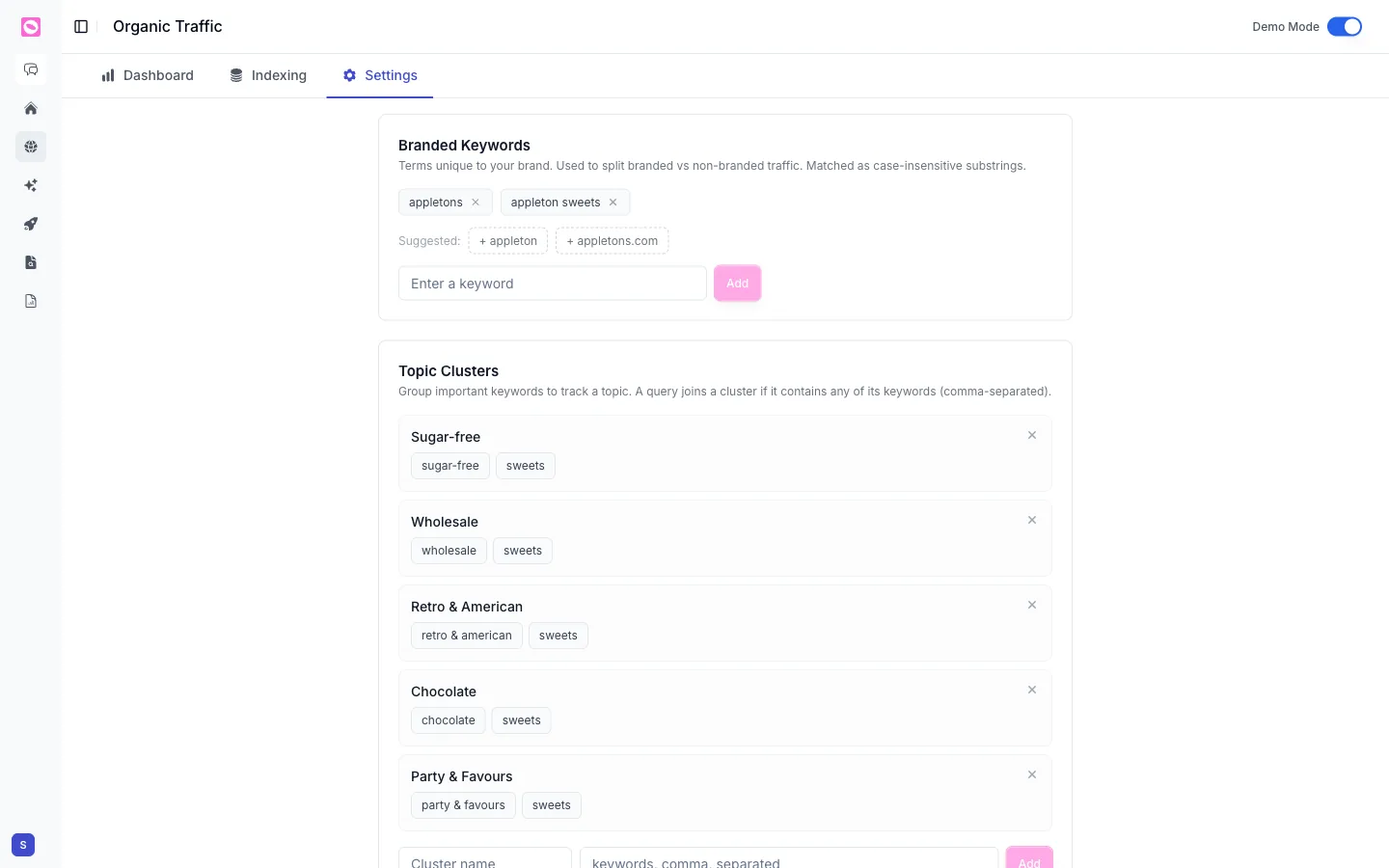
- Type a term unique to your brand in Enter a keyword and click Add.
- Add every variation people search: your name, common misspellings, your product names, your old name if you rebranded, and your domain.
- Check the Suggested: terms. Orchly guesses them from your domain and the queries Search Console already reports. Click one to add it; nothing is added until you do.
To remove a term, click the x on its chip.
Orchly matches branded terms as case-insensitive substrings, so “appletons” also catches “Appletons sweets” and “buy appletons online”. Any query containing one of your terms counts as branded. Everything else is non-branded.
Misspellings and spacing matter. If people search “orchley” or “orch ly”, add both. The more variations you catch, the cleaner your non-branded number, and that’s the number that proves your SEO is working.
How to read the branded vs non-branded split
On the Dashboard tab, with Search Console picked as the source, use the dropdown next to the date range:
- All traffic: every query, the default.
- Branded only: just searches that contain one of your branded terms.
- Non-branded: everything else.
The metric cards, chart and Keywords table all follow the choice. The filter is a Search Console keyword concept, so it doesn’t appear in the GA4, Bing or combined views.
Treat non-branded clicks and impressions as your SEO scorecard. Treat branded as a read on overall brand demand. You can go one step further and group non-branded queries into topic clusters to see which themes bring in new people.
See how to track organic search traffic in Orchly for the rest of the dashboard.
Branded searches in AI answers
The same idea applies to AI search. A prompt like “is Orchly any good” names you, while “best AI visibility tool” doesn’t. Orchly labels tracked prompts as branded or non-branded so your AI share of voice isn’t inflated by questions that already mention you. See how to tag, label and manage AI prompts.