How to track AI citations and get cited by ChatGPT
See which pages ChatGPT, Perplexity and Google AI Overviews cite for your prompts, how often, and which cited pages mention competitors but not you.
To track AI citations, open AI Visibility and click the Citations tab. It lists every page and domain that ChatGPT, Perplexity, Google AI Overviews and your other engines cite when answering your prompts, how often each one is used, and whether your brand is mentioned on it.
Citations tell you which content AI trusts in your category. The Mention Gap view then shows where competitors are named on those pages and you aren’t.
The four citation charts
The top of the tab gives you the shape of your citation sources at a glance:
- Citation by Owner splits citations between Our Brand, Competitors and Others.
- Citation by Website Type shows the kinds of sites cited, such as corporate sites, news, blogs, Reddit, YouTube or wikis.
- Citation by Content Type shows the formats cited, like how-tos, listicles, comparisons, reviews and docs. The format models reach for most is usually the one worth writing next.
- Source Usage by Domain charts the most cited domains over time.
Filter everything with the brand picker, All Topics, tags, branding, intent, All Platforms, All Content Types, All Source Types and the date range.
Sources: every page AI cites
The Sources view lists cited pages. Use Group by URL for individual pages or Group by Domain to roll them up by site. The brand select narrows it to All brands, Own brand or Competitors.
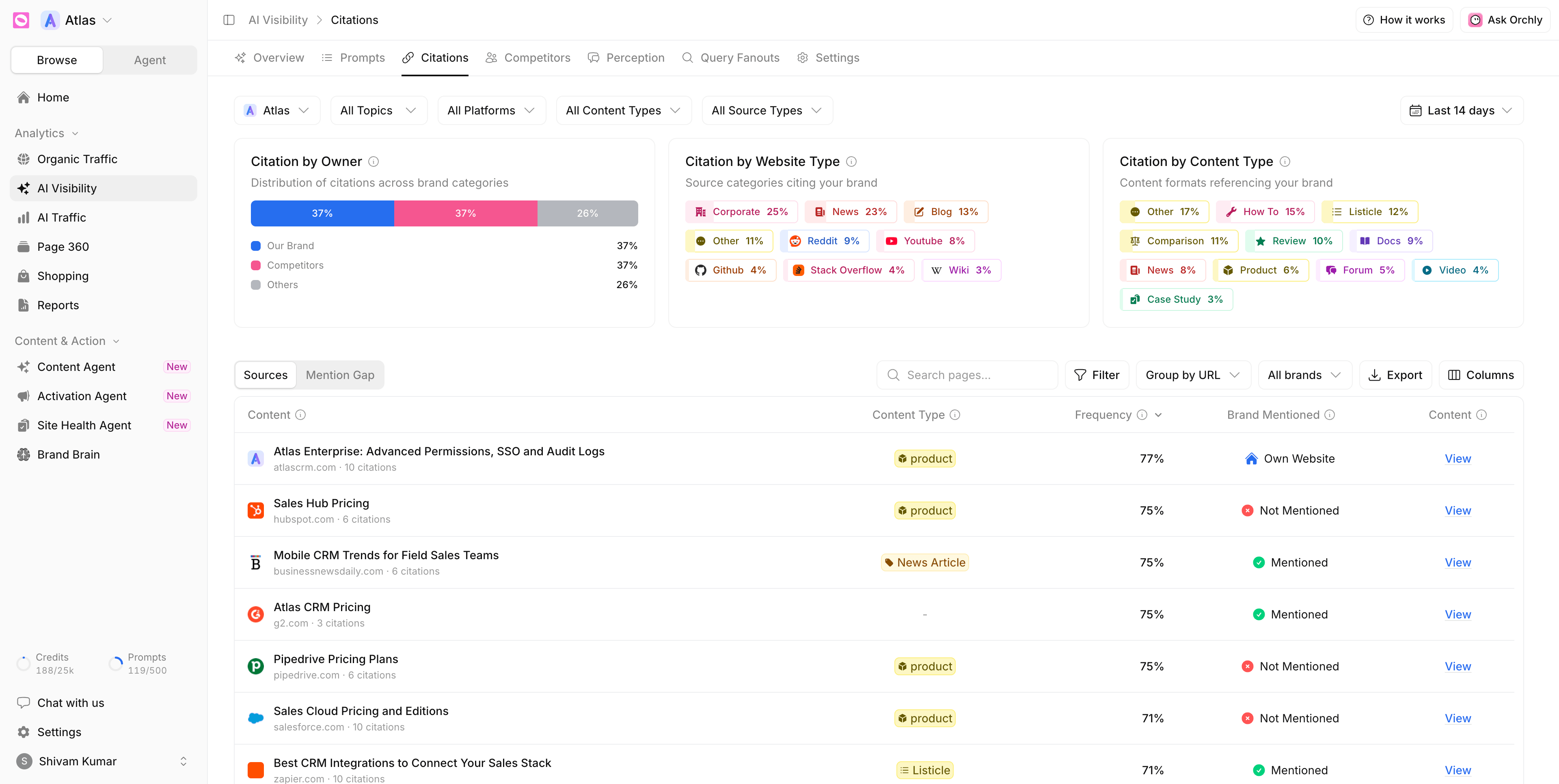
When grouped by URL, each row shows:
| Column | What it tells you |
|---|---|
| Content | The cited page, its domain and how many citations it earned |
| Content Type | The kind of page: product, listicle, how-to, comparison, news and so on |
| Frequency | The share of answers in view that cited this page |
| Brand Mentioned | Own Website, Mentioned, Not Mentioned or Not Scanned Yet |
| View | The page text as Orchly captured it, so you can read what the model drew on |
Grouped by domain, the columns are Source, Source Type, Content Type, Frequency and Brand Mentioned. Expand a domain to see its pages, or click it for its citation share over time, the responses that cited it and the platforms that used it.
Orchly saves the text of each cited page, so View still shows what the model read even if the page has changed since. Captures refresh every 90 days. Not Scanned Yet means Orchly hasn’t read that page yet.
Brand Mentioned is the column to scan. A page with high frequency and Not Mentioned is a source actively shaping AI answers without you in it. That’s your outreach list.
Use Filter for finer cuts, search by page or domain, and Export the list.
Mention Gap: where competitors win and you don’t
Orchly reads the content of every cited page and records which brands it names. Mention Gap turns that into a grid.
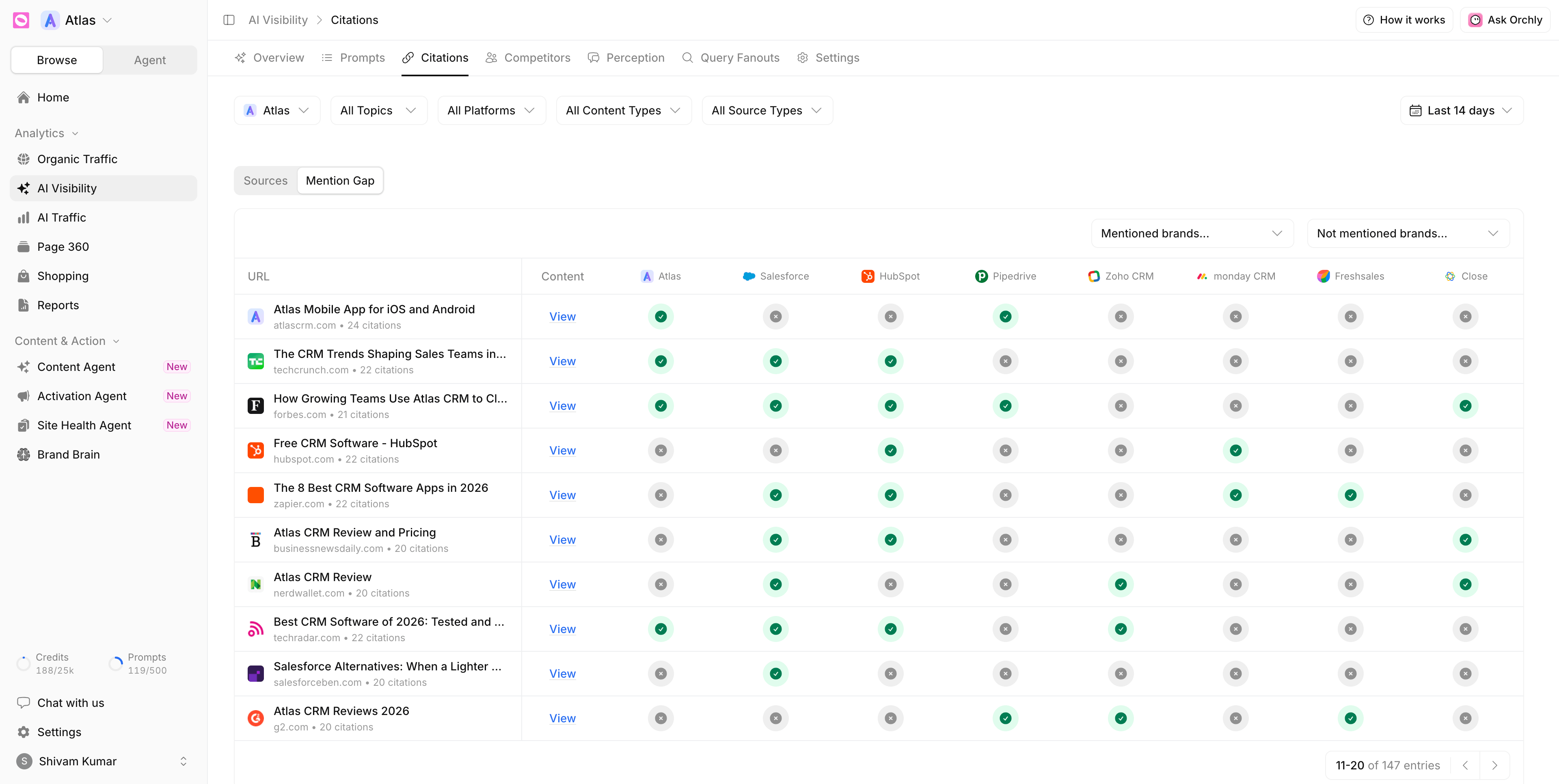
Read across a row. A page AI cites heavily, where three competitors have a check and you have a cross, is the highest-value gap you have.
Use Mentioned brands… and Not mentioned brands… to cut straight to it. For example, every cited page that mentions Salesforce but not you.
For each gap, pick one move: pitch the publisher for an update, earn a spot on the list, or publish a stronger page of your own. The Activation Agent can draft the outreach for you.
How to get cited by ChatGPT: what to do with citation data
- Your own pages that get cited. Find them with Own brand or the Own Website label. Study what they have in common and repeat the pattern.
- Your pages that should get cited but don’t. Check them in Page 360 and run a Site Health audit for AI crawl issues.
- Third-party pages without you. Work the Mention Gap list, starting with the highest frequency.
- The dominant content type. If AI keeps citing comparisons in your space, write comparisons. The Content Agent can take it from there.
To see citations for a single question, open a prompt on the Prompts tab and switch to its Citations tab. To see which of your pages AI crawlers actually visit, see track AI traffic.